

If you’re a Miva graduate planning to study or work outside Nigeria, you may be asked to provide a credential evaluation of your Miva qualification.
A WES evaluation can be useful when a graduate wants to use a Nigerian qualification outside Nigeria, particularly in the United States or Canada. WES doesn’t function as a university accreditation agency.
Depending on the requirements of the receiving organisation, a WES report may help with:
- University or college admission
- Employment
- Professional licensing
- Immigration-related processes
- Demonstrating the US or Canadian equivalent of an international qualification
WES lists these among the uses of its credential evaluation reports.
However, not every organisation requires WES.
Some universities, employers, or professional bodies may accept international qualifications without a WES evaluation. Others may require an evaluation from a particular provider or require a specific type of report.
WES therefore recommends checking the requirements of the organisation receiving the report before applying.
Here is the general process.
In This Post
A Step-by-Step Guide on Applying for a WES Evaluation
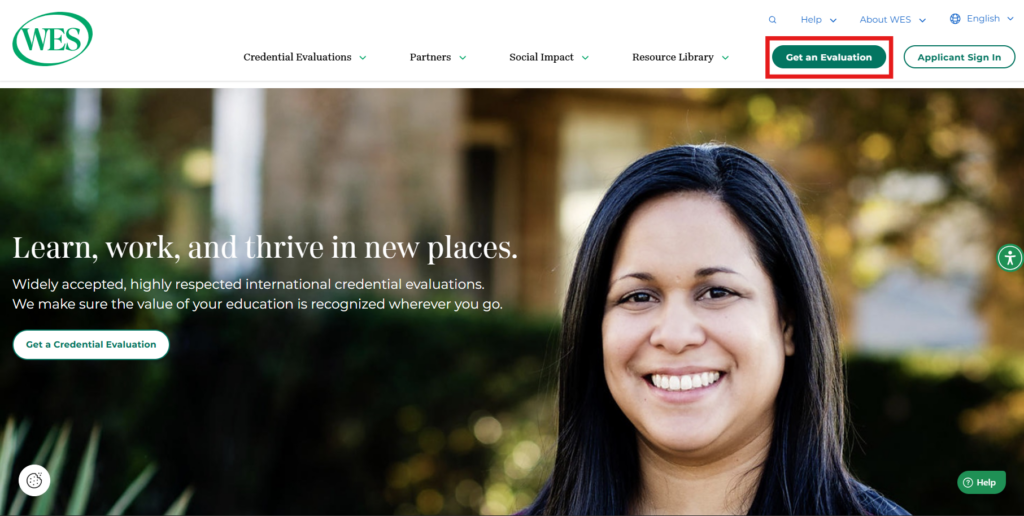
1. Visit the WES website
Go to WES and select Get an Evaluation.
2. Create or log in to your WES account
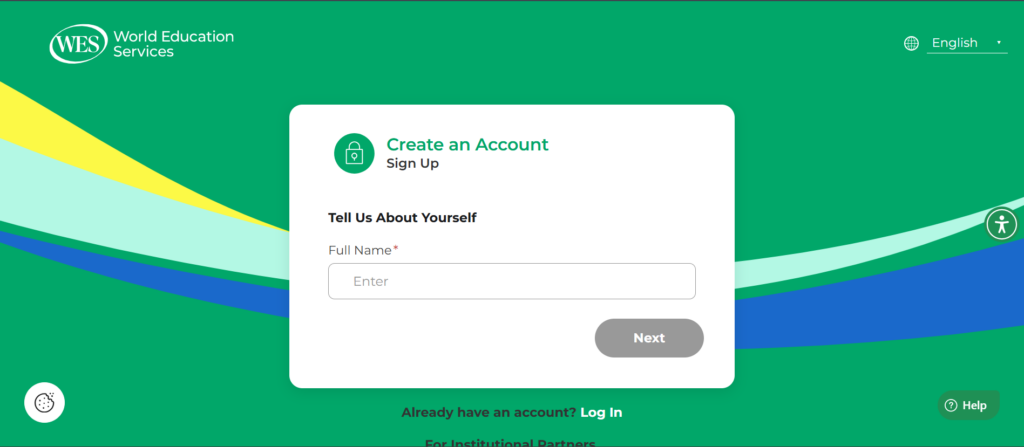
If you already have a WES account, log in.
If you don’t have one, create an account.
Use an email address that you can access throughout the evaluation process, as WES may contact you about your application.
3. Start a new application
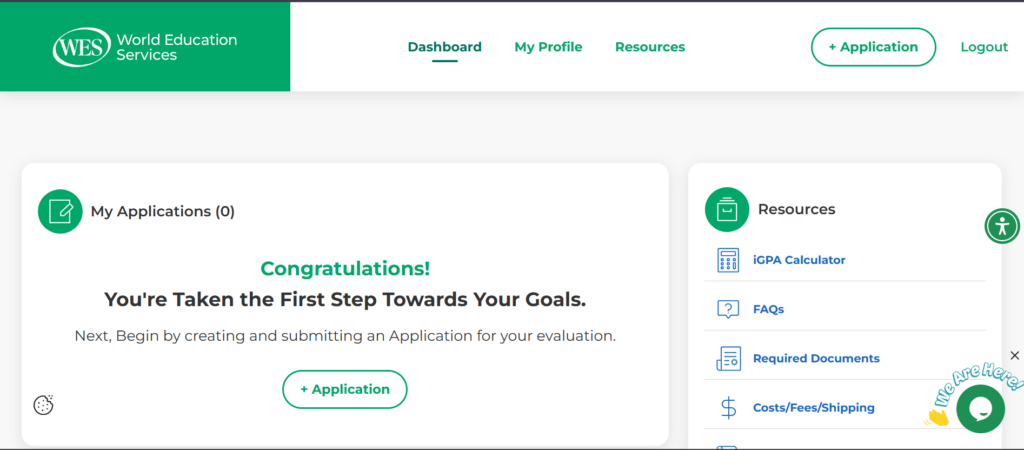
Once you’re logged in, select + Application to start a new application.
4. Select your destination country
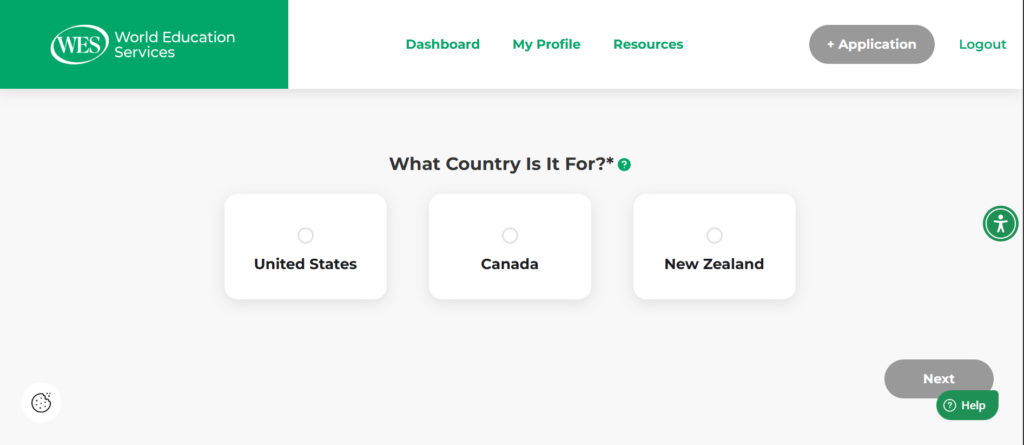
Select the country where you intend to use your WES evaluation.
For example, if you’re applying for postgraduate admission at a university in the United States, select United States.
5. Select your evaluation purpose
Next, select the purpose of your evaluation.
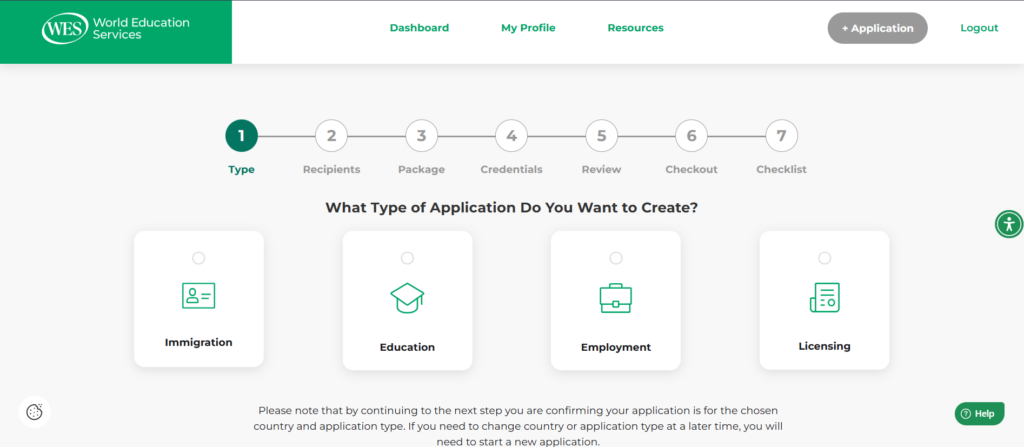
If you’re applying to a university outside Nigeria for further studies, select Education, then Graduate Admission.
Your selection should match the reason you need the evaluation.
6. Enter your contact details and address
Enter your contact details and physical address.
Make sure the address you provide is where you want your copy of the WES evaluation report delivered.
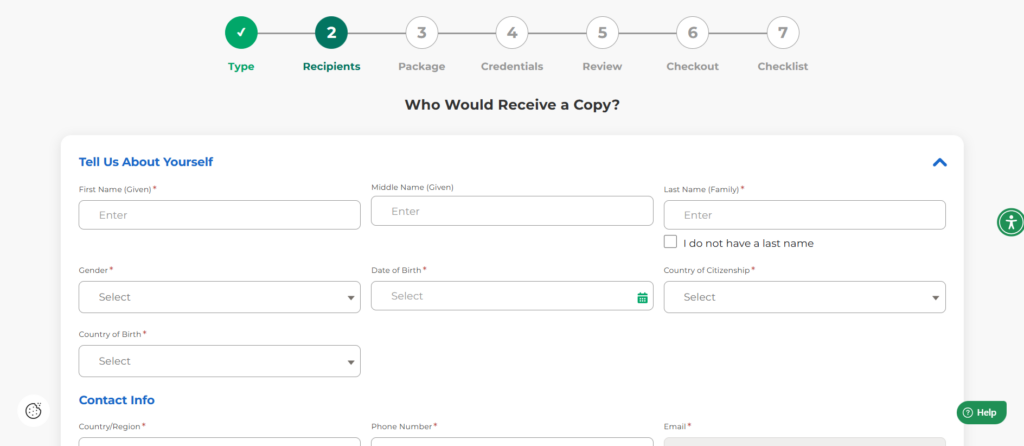
You’ll also select a delivery method and indicate whether you need additional copies of your report.
Save your choices and continue.
7. Add the institution receiving your evaluation
Next, add the university, employer, or other organisation that should receive your evaluation.
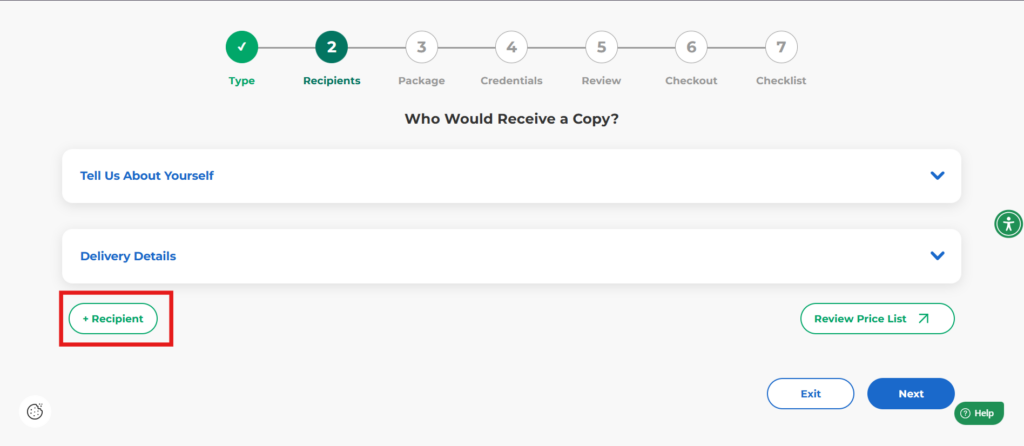
If you’re applying to a university, select the institution and provide the relevant school, department, or office if required.
Pay attention to the Attention field. This should contain the office responsible for receiving academic records.
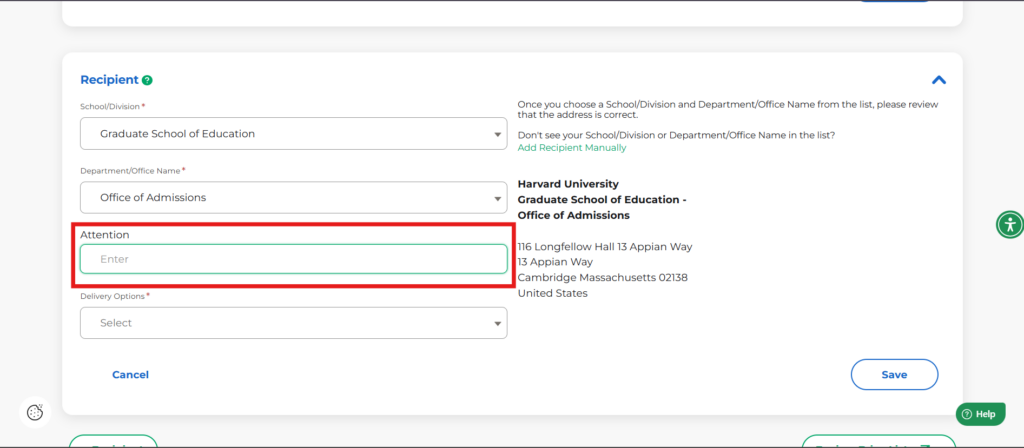
For example, if the university’s instructions state that the Admissions Office should receive the evaluation, enter Admissions Office in the appropriate field.
Always check the institution’s instructions before completing this section.
8. Select a delivery option
Select your preferred delivery option and save your selection.
Then continue to the next section.
9. Choose an Application Package
On the next page, you’ll find a list of application packages and what they entail. You can view more details of each package in another tab.
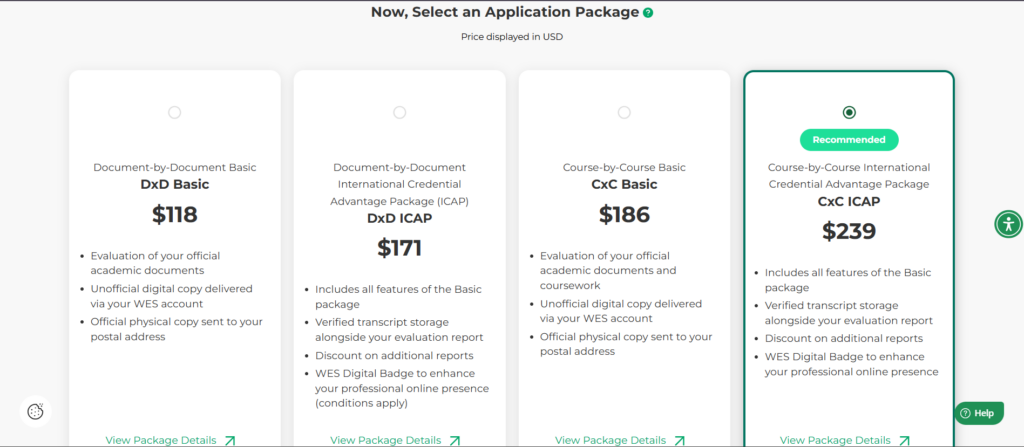
Note that cost depends on factors such as the recipient country, your evaluation purpose, and application package.
Select the application package that meets your needs and proceed.
10. Enter details of your certificate(s)
Next, enter the details of your academic qualifications.
This would be your bachelor’s degree and/or postgraduate degree.
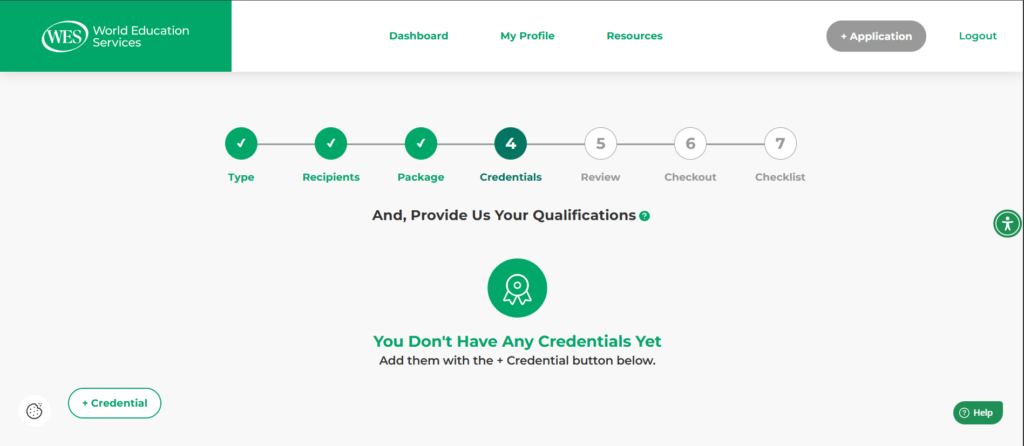
If you have completed more than one qualification and want WES to evaluate each of them, add the relevant credentials to your application.
Enter your details exactly as they appear on your academic documents, including:
- Your name
- Name of the institution
- Credential
- Programme
- Dates of study
Make sure the information you enter matches your academic documents to avoid processing delays.
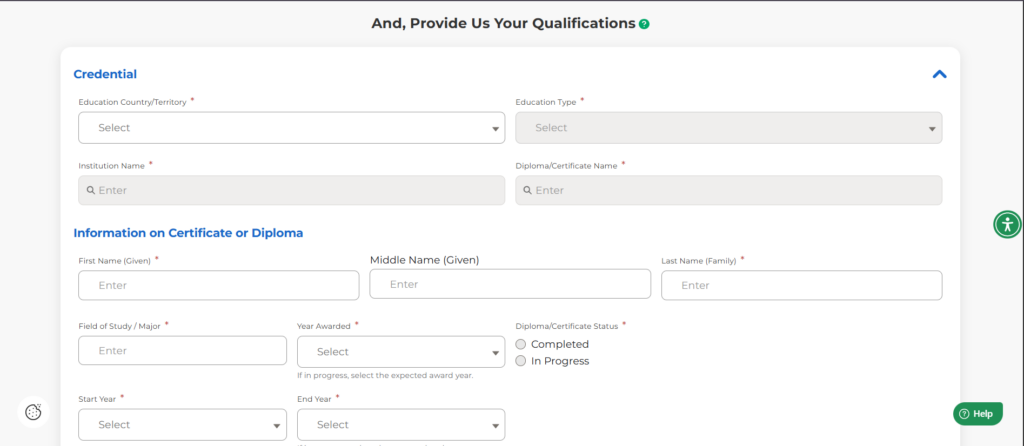
If your certificate isn’t listed, type it out manually.
Note: You can only enter details of your certificate at this stage. You’ll provide transcripts or statements of results at a later stage.
11. Review your application
Before submitting your application, carefully review the information you’ve provided.
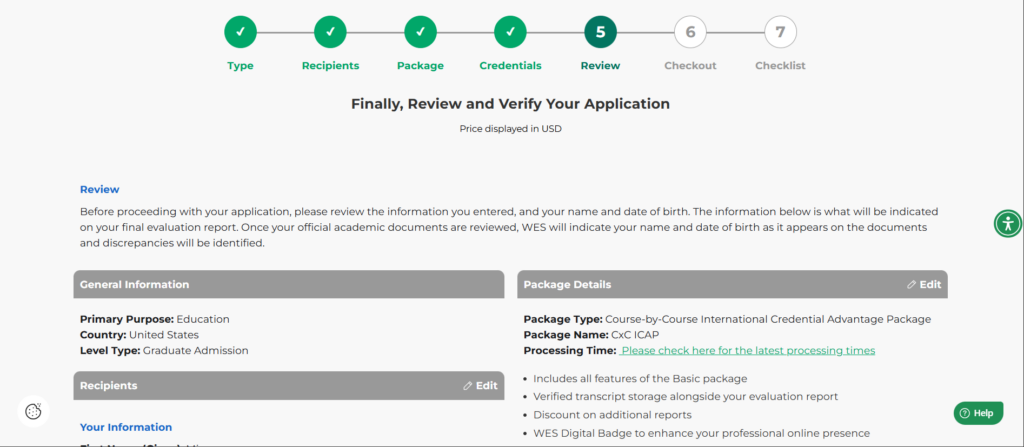
Check your:
- Personal details
- Evaluation purpose
- Recipient
- Academic credentials
- Delivery options
Correct any errors before proceeding.
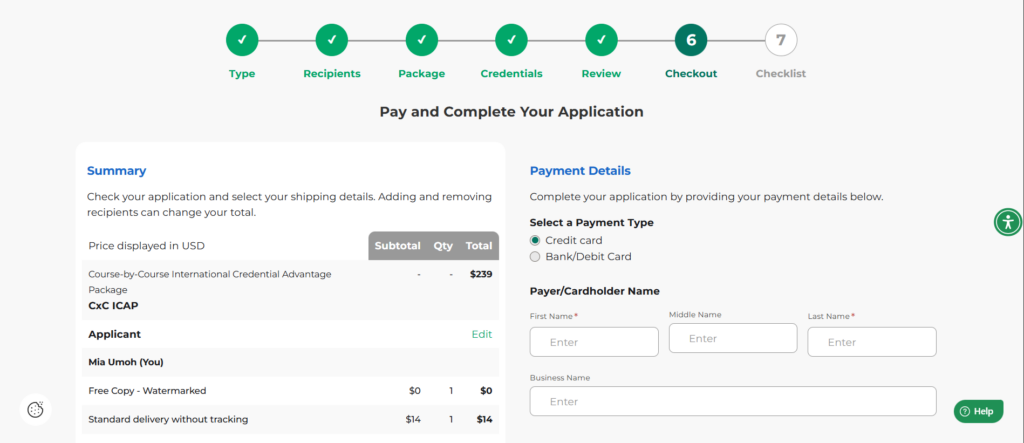
12. Complete your payment
Once you’ve confirmed that your information is correct, proceed to checkout and complete your payment.
13. Check your document checklist
After payment, WES will provide a checklist showing the documents required for your evaluation.
The documents and submission requirements may differ depending on the evaluation purpose you selected when creating your application.
Follow the specific requirements shown in your WES account.
How to Submit Your Miva Academic Records to WES
You generally do not need to send physical copies of your original academic documents to WES.
Transcripts
For your Miva transcripts, you’ll need to follow the approved process for having your transcripts sent directly to WES.
On the checklist page, you’ll find a form you’ll need to submit to the appropriate office at Miva when requesting your academic records.
Make sure you provide your WES reference number when submitting your request, where required, so that your academic records can be correctly matched to your WES application.
Certificates and Statement of Results
You will also need to upload a clear copy of your degree certificate or statement of results to your WES account, depending on the requirements shown in your document checklist.
Keep Your WES Reference Number
WES will provide you with a unique reference number for your application.
Keep this number safe throughout the evaluation process.
You’ll need to include it when submitting documents or communicating with WES about your application.
Application Process Differs by Evaluation Purpose
The WES application process can differ depending on the purpose of your evaluation and the academic credentials you’re submitting.
For this reason, use the document checklist and instructions in your WES account as your main guide.
If you’re a Miva graduate, make sure you also follow Miva’s process for requesting and submitting your academic records.
Frequently Asked Questions
Can Miva graduates apply for a WES evaluation?
Yes. If you need a credential evaluation for further studies, employment, or another purpose, you can create a WES application and provide your Miva academic credentials for evaluation, subject to the requirements of the organisation requesting the evaluation.
Is Miva Recognised by WES?
Yes. WES recognises Miva Open University because it is licensed and recognised by the National Universities Commission (NUC).
Is Miva Accredited by WES?
WES does not function as a university accreditation agency. WES considers whether an institution is officially recognised or accredited in its home country and evaluates individual credentials to determine how the international qualification compares with educational standards in the United States or Canada.
What Miva credential should I add to my WES application?
Add the academic credential WES requires you to evaluate. For example, if you’re a Miva graduate applying for postgraduate admission, you will need to add your Miva bachelor’s degree.
Does Miva send transcripts directly to WES?
Yes. Follow the document submission instructions provided in your WES account and Miva’s process for requesting academic records.
Do I need to send my original Miva certificate to WES?
Do not send a physical copy of your original certificate to WES. Instead, upload an electronic copy to your account and follow the document requirements shown in your WES account.
Where can I find my WES reference number?
WES provides a unique reference number for your application when you complete your application. Keep it safe and use it when submitting documents or communicating with WES about your evaluation.
Conclusion
If you’re a Miva graduate and need a WES evaluation, start by confirming the requirements of the university, employer, or organisation requesting it before you apply.
If Miva needs to send your academic records directly to WES, follow the required process for requesting your transcripts and provide your WES reference number where required.
Keep your WES account details and reference number safe, and check your account regularly for updates on your evaluation.
Miva wishes you all the best in your future endeavours.